Laravel GA4 server-side tracking for lost sales
Laravel GA4 server-side tracking sends the purchase event through Google's Measurement Protocol from a queued job when the payment is confirmed, using the client_id and session_id that gtag's get command returns at checkout. A middleware re-issues gtag's cookies from the server, because Safari caps only cookies created through document.cookie to seven days. Nothing is sent without analytics consent, and events should reach Google within 48 hours.

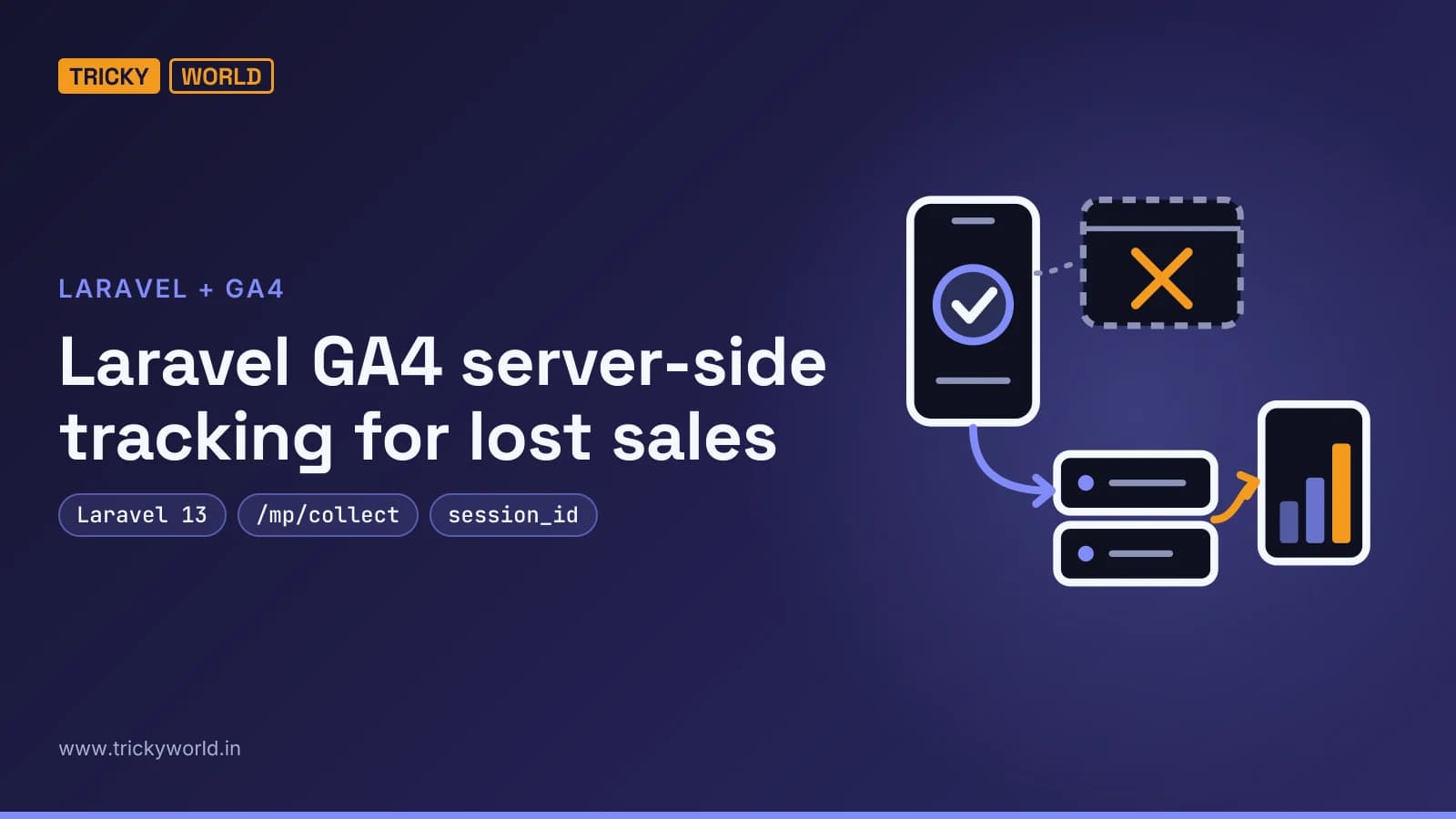
Laravel GA4 server-side tracking closes a gap most shops never see. Say a customer pays by UPI: their payment app takes over, the money arrives, and they never switch back to your thank-you page, so the browser tag never sends purchase. Your database has the order; Google Analytics doesn't. Sending that purchase from Laravel when the payment is confirmed puts it back, and a server-set cookie keeps Safari visitors from turning into new users every week.
You'll see vendors promise to "recover 30%" of lost data. Those figures come from marketing pages without a published method, and your own gap depends on your traffic, your consent rate and how customers pay. This guide shows where GA4 loses sales, builds a Laravel 13 fix for two of the leaks, and ends with how to measure what you actually got back. The complete, tested app is on GitHub as trickyworld_laravel_ga4.
Why does GA4 miss sales your Laravel shop records?
GA4's browser tag can only report what happens in the browser while it is allowed to run. Four things get in the way, and server-side code fixes some of them, not all:
Where data goes missing | What a Laravel server can do |
|---|---|
The thank-you page never loads: a closed tab, a failed redirect, a switch to a payment app. | Send the purchase itself when the payment is confirmed. |
An ad or tracker blocker stops the tag altogether. | Still count the sale, but with no traffic source. |
Safari forgets the visitor after seven days. | Re-issue the cookie from the server, which Safari doesn't cap. |
The visitor declines analytics. | Nothing, and it shouldn't: no consent, no tracking. |
The Safari row needs a word of explanation. WebKit's Intelligent Tracking Prevention 2.1 caps cookies created through document.cookie to seven days, and gtag creates _ga that way. Google's own cookie documentation states the result: a maximum of 400 days for Chrome and 7 days for Safari when a user doesn't return. WebKit is just as clear about the exception: "Only cookies created through document.cookie are affected by this change."
Measurement Protocol, server-side GTM or tag gateway?
Google offers three server-side routes, and they solve different problems:
The GA4 Measurement Protocol lets your server send events straight to Google Analytics. Google is explicit that it exists "to augment automatic collection through gtag, Tag Manager, and Google Analytics for Firebase, not to replace it." That is exactly the purchase case.
Server-side tagging moves your tags into a Google Tag Manager server container. Google estimates $30 to $50 per server per month once you upgrade from the free Cloud Run setup, and recommends at least three instances.
Google tag gateway for advertisers serves the Google tag from your own domain through your CDN, load balancer or web server.
For a Laravel shop whose biggest loss is the purchase itself, I'd start with the Measurement Protocol. It costs nothing to run, lives in code you already deploy, and needs no new infrastructure. Server-side tagging earns its cost once you run many tags for many vendors.
Step 1: Create an API secret and configure Laravel
The Measurement Protocol authenticates with an API secret. Per Google's guide to sending events, you create one under Admin > Data collection and modification > Data streams, on your web stream, under Measurement Protocol API secrets. It must stay on the server, never in JavaScript. Add it and the stream's measurement ID to .env:
# GA4 Measurement Protocol (config/ga4.php)
GA4_MEASUREMENT_ID=
GA4_API_SECRET=
# https://region1.google-analytics.com keeps collection in the EU
GA4_ENDPOINT=https://www.google-analytics.com
# true: events go to Google's validation server only, and its answer is logged
GA4_DEBUG=false
GA4_CONSENT_COOKIE=analytics_consent
# The domain gtag sets cookies on, such as .example.com; empty means the current host
GA4_COOKIE_DOMAIN=
Change the endpoint to https://region1.google-analytics.com if collection must stay in the EU.
Step 2: Stop Laravel encrypting gtag's cookies
Laravel's documentation on responses explains that the EncryptCookies middleware encrypts and signs every cookie by default. gtag writes its cookies in plain text, so Laravel can't read them until you exclude them. The exclusion list takes exact names only, with no wildcards, and _ga_<ID> depends on your measurement ID. That's why the list is built in a service provider, from config:
public function boot(): void
{
    // Laravel encrypts every cookie it reads or writes. gtag's cookies and the consent cookie are set in the
    // browser in plain text, so Laravel must leave them alone. The names come from config, which (unlike
    // env() in bootstrap/app.php) still works after `php artisan config:cache`.
    EncryptCookies::except([...Ga4::cookieNames(), config('ga4.consent_cookie')]);
}
Built this way, the names keep working after php artisan config:cache, when env() calls outside config files return nothing.
Step 3: Capture the visitor's GA4 IDs at checkout
A server-side event joins the right visitor only if it carries the same client_id the browser tag uses. Google's docs recommend adding the session_id too. Rather than parse gtag's cookies, whose format Google doesn't document, the page asks gtag with its documented get command. The page does this only after the visitor accepts analytics, and copies both IDs into hidden form fields:
function startAnalytics() {
    if (!MEASUREMENT_ID) return;
    window.dataLayer = window.dataLayer || [];
    window.gtag = function () { dataLayer.push(arguments); };
    gtag('js', new Date());
    gtag('config', MEASUREMENT_ID);

    const script = document.createElement('script');
    script.async = true;
    script.src = `https://www.googletagmanager.com/gtag/js?id=${MEASUREMENT_ID}`;
    document.head.append(script);

    // Copy gtag's IDs into the form, so the server can report the sale as this visitor and session.
    for (const field of ['client_id', 'session_id']) {
        gtag('get', MEASUREMENT_ID, field, (value) => {
            document.querySelector(`[name="ga_${field}"]`).value = value ?? '';
        });
    }
}
In a headless Chrome run with real gtag.js, get returned a client_id of 1572316662.1794399063 and a session_id of 1794399063.
Step 4: Store the IDs with the order
The controller validates the IDs against that format and saves them with the order, along with whether the visitor accepted analytics:
public function store(Request $request): RedirectResponse
{
    // gtag's client and session IDs, copied into hidden fields by the page. Empty when the tag never ran.
    $ids = $request->validate([
        'ga_client_id' => ['nullable', 'regex:/^\d{1,20}\.\d{1,20}$/'],
        'ga_session_id' => ['nullable', 'regex:/^\d{1,20}$/'],
    ]);

    $order = Order::create([
        'product' => self::PRODUCT['id'],
        'amount' => self::PRODUCT['price'],
        'currency' => self::PRODUCT['currency'],
        'analytics_consent' => $request->cookie(config('ga4.consent_cookie')) === 'granted',
        ...$ids,
    ]);

    // A real shop redirects to its payment gateway here.
    return redirect()->route('orders.show', $order);
}
Never trust the fields blindly: the regular expressions reject anything but digits and the one dot a client ID contains.
Step 5: Send the purchase from the server
This is the core of Laravel GA4 server-side tracking: one class that posts events to Google. Note the consent block; it tells Google whether this visitor agreed to advertising use of their data:
public function send(string $clientId, array $events, bool $adConsent = false, ?string $userId = null): Response
{
    $path = config('ga4.debug') ? '/debug/mp/collect' : '/mp/collect';

    $payload = array_filter([
        'client_id' => $clientId,
        'user_id' => $userId,
        'consent' => [
            'ad_user_data' => $adConsent ? 'GRANTED' : 'DENIED',
            'ad_personalization' => $adConsent ? 'GRANTED' : 'DENIED',
        ],
        'events' => $events,
        // The validation server is strictest with ENFORCE_RECOMMENDATIONS; it only applies in debug mode.
        'validation_behavior' => config('ga4.debug') ? 'ENFORCE_RECOMMENDATIONS' : null,
    ], fn ($value) => $value !== null);
The request itself is a plain Http::post to /mp/collect, with the measurement ID and secret as query parameters.
A queued job sends the purchase when your payment gateway confirms the payment, so a slow call to Google never delays a customer:
public function handle(Ga4 $ga4): void
{
    $order = $this->order;

    // No analytics consent: send nothing. Already sent: a retry must not count the sale twice.
    if (! $order->analytics_consent || $order->ga_sent_at) {
        return;
    }

    $params = [
        'transaction_id' => (string) $order->id,
        'value' => (float) $order->amount,
        'currency' => $order->currency,
        'items' => [[
            'item_id' => $order->product,
            'item_name' => CheckoutController::PRODUCT['name'],
            'price' => (float) $order->amount,
            'quantity' => 1,
        ]],
        // Google recommends both, so the event counts in engagement and Realtime reports.
        'engagement_time_msec' => 100,
    ];

    if ($order->ga_session_id) {
        $params['session_id'] = $order->ga_session_id;
    }

    // A visitor who consented but whose browser never ran the tag still counts as a sale, without a source.
    $ga4->send($order->ga_client_id ?? Ga4::newClientId(), [['name' => 'purchase', 'params' => $params]]);

    $order->update(['ga_sent_at' => now()]);
}
Nothing is sent without analytics consent.
The ga_sent_at check stops a retried webhook from counting the sale twice. Send purchase from the server only, too. If the thank-you page fires it as well, the same sale can be counted twice. In the repository, a "Simulate a successful payment" button stands in for your gateway's webhook. A real webhook route skips CSRF and must verify the gateway's signature first.
Step 6: Re-issue gtag's cookies from your server
For the Safari leak, a Laravel middleware sends gtag's two cookies back in a Set-Cookie header, unchanged, but only for visitors who accepted analytics:
public function handle(Request $request, Closure $next): Response
{
    $response = $next($request);

    if ($request->cookie(config('ga4.consent_cookie')) !== 'granted') {
        return $response;
    }

    foreach (Ga4::cookieNames() as $name) {
        $value = $request->cookie($name);

        if (is_string($value) && preg_match(self::VALUE, $value)) {
            $response->headers->setCookie(new Cookie(
                $name, $value, now()->addDays(400), '/', config('ga4.cookie_domain'),
                $request->isSecure(), httpOnly: false, raw: true, sameSite: Cookie::SAMESITE_LAX,
            ));
        }
    }

    return $response;
}
Three details matter here. The cookie is not httpOnly, because gtag must still read it. It is raw, because gtag's newer session cookie, such as GS2.1.s1794399063$o1$g0$t1794399063$j60$l0$h0, contains $ signs that URL-encoding would break. And the value must match gtag's pattern, or the middleware won't echo it back.
Register it for web routes in bootstrap/app.php with $middleware->web(append: [RefreshGaCookies::class]);. In the browser test, the cookies gtag set came back from Laravel with Max-Age=34560000 (400 days), and gtag kept the same client ID afterwards.
Step 7: Validate the events before they reach your reports
The live endpoint answers with a success code even for a malformed event, so you can't tell from the response. Google's validation server checks the payload and keeps it out of reports. With GA4_DEBUG=true, the app sends there instead and logs Google's answer. Alongside its Laravel feature tests, the repository includes one that sends a real purchase:
php artisan test                          # payload, consent, retries and cookie refresh, with HTTP faked
GA4_LIVE_TEST=1 php artisan test          # also sends one purchase to Google's validation server
An empty validationMessages list means Google accepted the event. The validation server doesn't check your API secret, though, so confirm the first real purchase in GA4's Realtime report.
How much data will you actually recover?
Measure it rather than trust a percentage. Before you switch on the server-side event, compare 30 days of paid orders in your database with GA4's purchases for the same days. The difference is your gap. After the switch, the same comparison shows how much of it closed, and I'd repeat it every month. The rest is mostly visitors who declined analytics, which is as it should be.
If you already query GA4 with an AI agent, our guide to the GA4 MCP server shows how to pull those purchase counts with one prompt.
What Laravel GA4 server-side tracking can't fix
It doesn't override consent. A visitor who declined analytics should not appear in GA4 from the browser or the server, and the job enforces that.
It can't invent a traffic source. When a blocker stopped gtag, there is no client_id, so the job sends the sale under a new one: the revenue counts, but GA4 can't say which campaign earned it.
The 48-hour window matters. Google says Measurement Protocol events should arrive within 48 hours of the original browser event, or they "may not be processed as expected, particularly for purposes like conversion attribution." A queue that stalls over a long weekend loses that link.
And it is a supplement, not a replacement. Google warns that sending events only through the Measurement Protocol gives partial reporting, so keep the browser tag for page views and sessions.
Consent for Indian and EU customers
India's Digital Personal Data Protection Rules were notified in November 2025 with an 18-month phased compliance timeline. They require standalone, clear consent notices that explain the specific purpose of collecting personal data. An analytics banner like the one in the repository is a start, not legal advice: describe exactly what you measure and why.
For visitors in the EU, Google's consent signals include ad_user_data and ad_personalization. The Ga4 class sends both as DENIED unless you pass the visitor's advertising consent, which is the safe default. If you also run Google Ads, I'd collect that choice in the banner and pass it through.
Start with the purchase event. It is the one number your finance team will check against GA4, and the one where a missing thank-you page costs you most.
Frequently asked questions
How many events can one Measurement Protocol request carry?
Up to 25 events, each with up to 25 parameters, and up to 25 user properties, in a JSON body under 130 kB, according to Google's Measurement Protocol reference. Event and parameter names can be 40 characters long, and a parameter value 100 characters on a standard property.
Which event names can't be sent from the server?
Google reserves names that automatic collection uses, including session_start, first_visit and user_engagement, so the Measurement Protocol rejects them. Parameter names also can't begin with , firebase, ga_, google_ or gtag.
Can I send a purchase that was confirmed days later?
You can backdate an event by up to 72 hours with timestamp_micros. Beyond that, Google's default behaviour accepts the event but moves its timestamp to 72 hours ago. Attribution is the tighter limit: events that arrive more than 48 hours after the browser session may not be credited to it.
Does this work on Laravel 12?
The repository targets Laravel 13 and was tested on 13.42.0. Laravel 12 now receives only security fixes, until 24 February 2027, so a new project should start on Laravel 13.

About the author
Vishal · Software & security engineerVishal writes Trickyworld's tutorials and interview-preparation guides on programming, databases, cyber security and AI. Vishal has been shipping production software long enough to have firm opinions about Python, PHP, Node.js, and JavaScript, and to have been wrong about each of them at least once. The work has run the whole stack: Drupal and Laravel applications, React front ends, MySQL and MongoDB underneath, Redis and Memcached for the things that had to be fast, Apache Solr for the things that had to be findable. That last part turned out to matter more than anyone expected. Tune a Solr index for a season, then watch a language model confidently retrieve the wrong document, and you recognise an old problem wearing new clothes. Most of what is hard about AI systems is not the model. It is retrieval, caching, latency budgets, and deciding what the system does when the answer comes back wrong — which is work he has been doing since well before anyone called it AI engineering. He plays a lot of games, which is less a hobby disclosure than an admission of where a good share of his engineering instinct came from. Real-time systems with a frame budget. State that has to stay coherent while a player does something no designer anticipated. The permanent question of what happens when the frame cannot finish in time. Those habits carry over more directly than they have any right to. He has written several books on programming, all built on the same conviction: most technical writing is unclear because the author never decided what to leave out. More from Vishal → · Editorial policy